Local Business Website Redesign: The Conversion and Local SEO Playbook
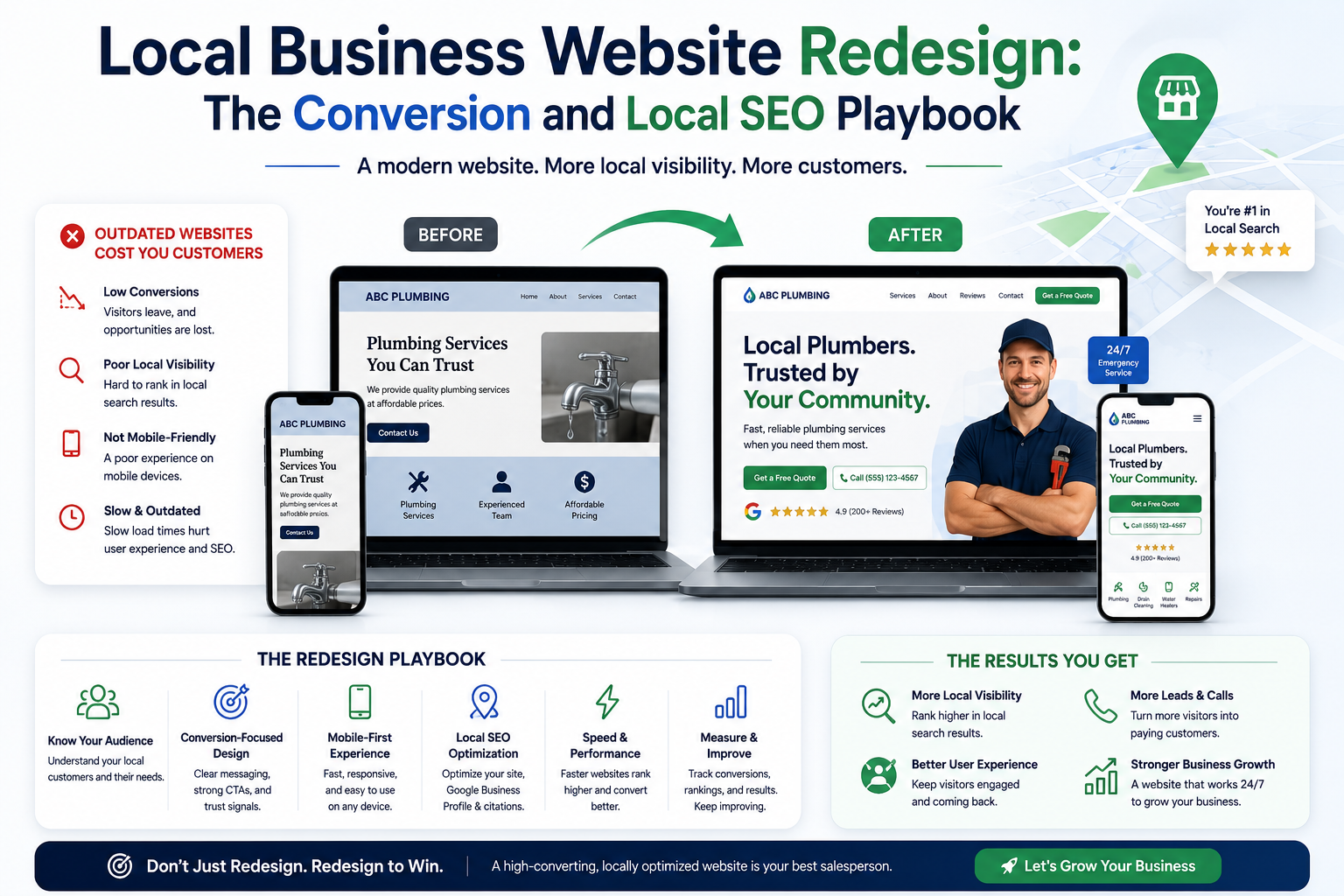
A practical local business website redesign playbook covering local SEO, conversion paths, trust, speed, service pages, tracking, accessibility, and lead quality.
Local Business Website Redesign: The Conversion and Local SEO Playbook
A local business website redesign should not begin with colors, animations, or a new homepage mockup. It should begin with evidence: which services produce profit, which locations generate demand, where prospects abandon the site, what questions delay enquiries, and why competing businesses receive more calls.
Many local websites fail for operational reasons rather than visual ones. Visitors cannot confirm whether the company serves their area. Service pages contain generic copy. Mobile contact buttons are difficult to use. Reviews are disconnected from the relevant service. Forms collect too much information or too little. Google cannot clearly identify the business, service, and location relationships.
A successful redesign aligns search visibility with conversion performance. It creates pages that can rank for commercially useful searches, gives prospects enough confidence to make contact, and sends complete attribution data to the sales team.
Meta description: Plan a local business website redesign that improves local SEO, qualified leads, mobile conversion, trust, page speed, and marketing attribution.
Search intent: Transactional
Contents
1. Diagnose the current website before redesigning it
2. Build a local search architecture around services and locations
3. Design conversion paths for calls, forms, and bookings
4. Improve trust, proof, and service clarity
5. Protect speed, mobile usability, and accessibility
6. Implement tracking, CRM routing, and lead qualification
7. Launch without losing rankings
8. Frequently asked questions
9. Final recommendations
1. Diagnose the Current Website Before Redesigning It
A redesign without a baseline can replace visible problems while preserving the commercial problems underneath.
Begin with a structured audit of search performance, user behavior, sales outcomes, technical health, and content quality.
Review Business Performance First
The website should reflect the economics of the business.
Document:
- Highest-margin services
- Services with repeat revenue
- Areas with the strongest close rates
- Services that create low-quality enquiries
- Seasonal demand patterns
- Average response time
- Common objections
- Typical sales cycle
- Capacity constraints
- Services the business wants to grow
A redesign should make profitable services easier to discover and understand. It should not give equal prominence to every offering when some services are more valuable or more suitable for the company.
Audit Search Demand and Existing Rankings
Review Google Search Console for:
- Queries producing impressions
- Queries producing clicks
- Pages losing visibility
- Pages ranking between positions 4 and 20
- Branded versus non-branded searches
- Mobile click-through rate
- Indexing problems
- duplicate pages
- Soft 404 errors
- Core Web Vitals
- Links pointing to removed URLs
The pages already ranking near the first page may be more valuable than a new design concept. They need careful preservation, expansion, or consolidation.
Use GA4, call tracking, CRM records, and form data to identify which landing pages lead to qualified conversations rather than counting all enquiries as equal.
Interview Sales and Customer-Facing Teams
Sales teams know where website messaging fails.
Ask:
- Which questions are repeated on almost every call?
- Which prospects misunderstand the service?
- What information creates trust?
- Which leads are outside the service area?
- Which services attract price-only enquiries?
- What causes prospects to delay?
- What proof helps close deals?
- Which competitors are commonly mentioned?
These answers should influence page content, form fields, FAQs, case studies, navigation, and CTA placement.
Pre-Redesign Scorecard
| Area | Current Evidence | Risk | Redesign Requirement | |
|---|---|---|---|---|
| Organic traffic | Search Console landing pages | Traffic loss | Preserve valuable URLs | |
| Lead volume | Forms and calls | Misleading totals | Separate qualified leads | |
| Mobile conversion | Device reports | Poor contact rate | Persistent mobile CTA | |
| Service coverage | Existing content | Keyword gaps | Dedicated service pages | |
| Location relevance | Rankings by area | Weak local visibility | Location content model | |
| Page speed | Field and lab data | Abandonment | Performance budget | |
| Trust | Reviews and credentials | Low confidence | Proof near decisions | |
| Tracking | GA4 and CRM | Missing attribution | Event and source mapping |
Want More Inquiries from Local Customers?
Dominate local map searches and build automated review workflows for your brick-and-mortar business.
2. Build a Local Search Architecture Around Services and Locations
A local business website needs a clear relationship between the company, its services, and the places it serves.
Publishing one page that lists every service and every city rarely provides enough depth for users or search engines.
Design the Core Page Hierarchy
A practical structure might include:
/
├── services/
│   ├── emergency-plumbing/
│   ├── water-heater-repair/
│   └── drain-cleaning/
├── locations/
│   ├── austin/
│   ├── round-rock/
│   └── cedar-park/
├── case-studies/
├── reviews/
├── about/
├── contact/
└── resources/
For businesses with meaningful demand at the service-and-location level, selected pages may combine both dimensions:
/services/emergency-plumbing/austin/
Do not generate every possible combination. Publish a page only when there is genuine demand, operational coverage, and enough unique information to help a prospect.
What a High-Quality Service Page Needs
A service page should answer:
- What problem does the service solve?
- Who is the service suitable for?
- What is included?
- What is excluded?
- How does the process work?
- How quickly can the business respond?
- What factors affect price?
- Which areas are covered?
- What risks arise from delaying?
- What proof supports the claim?
- What should the visitor do next?
A generic paragraph followed by a contact form is not enough for a competitive local market.
Local Business Website Redesign Page Mapping
During a local business website redesign, map every target search theme to one primary page.
Example:
| Search Theme | Primary Page | Supporting Content | |
|---|---|---|---|
| Emergency plumber | Emergency plumbing service | Burst pipe guide | |
| Water heater repair | Water heater repair service | Repair versus replacement article | |
| Plumber in Austin | Austin location page | Austin case studies | |
| Commercial plumbing | Commercial plumbing service | Maintenance checklist | |
| 24-hour plumber | Emergency service page | Response process FAQ |
This prevents several weak pages from competing for the same search intent.
Create Location Pages That Contain Real Local Value
A useful location page can include:
- Services available in that area
- Typical response coverage
- Local case studies
- Area-specific customer reviews
- Relevant regulations or property conditions
- Team or branch information
- Local contact details where accurate
- Service boundaries
- Frequently asked local questions
- Directions or appointment information
Changing only the city name creates weak pages and can damage trust.
Internal Linking Rules
Service pages should link to:
- Related services
- Relevant location pages
- Case studies
- Pricing or cost guidance
- Contact or booking pages
- Supporting educational resources
Location pages should link back to the services available in that area.
Use descriptive anchor text. “Water heater repair in Austin” provides more context than “learn more.”
Structured Data
LocalBusiness schema can support entity clarity when it matches the visible business information.
<script type="application/ld+json">
{
  "@context": "https://schema.org",
  "@type": "HomeAndConstructionBusiness",
  "name": "Example Plumbing",
  "url": "https://example.com",
  "telephone": "+1-555-555-0100",
  "areaServed": [
    "Austin",
    "Round Rock",
    "Cedar Park"
  ],
  "address": {
    "@type": "PostalAddress",
    "streetAddress": "100 Example Street",
    "addressLocality": "Austin",
    "addressRegion": "TX",
    "postalCode": "78701",
    "addressCountry": "US"
  }
}
</script>
Do not publish a false address, fake office, or misleading service location. Structured data must represent the real business.
3. Design Conversion Paths for Calls, Forms, and Bookings
Local prospects often arrive with a specific problem and limited patience. The website should help them act without making them search for basic information.
Match the CTA to the Service
Different services may require different actions.
| Service Type | Primary CTA | Secondary CTA | |
|---|---|---|---|
| Emergency repair | Call now | Request callback | |
| Scheduled consultation | Book assessment | Ask a question | |
| High-value installation | Request estimate | View case study | |
| Recurring service | Get plan details | Compare options | |
| Professional advisory | Schedule consultation | Download checklist |
Using “Contact Us” everywhere misses the visitor’s immediate goal.
Build a Strong Mobile Contact Experience
Mobile design should include:
- A visible phone action
- A short booking or enquiry path
- Readable tap targets
- No overlapping chat widgets
- Forms that support mobile autofill
- Correct input types for email and phone
- Clear service-area messaging
- Fast-loading proof
- No full-screen pop-up blocking the page
A persistent bottom bar may work well for urgent services. It can include “Call” and “Request Quote,” provided it does not cover important content.
Form Length Should Match Lead Value
A short form can increase submission volume, but it may reduce lead quality.
A high-value service may benefit from qualification fields such as:
- Required service
- Location
- Preferred timeframe
- Budget range
- Property or business type
- Problem description
- Preferred contact method
Do not ask for information that the sales team will not use.
Reduce Friction Around the Form
Place relevant reassurance close to the action:
- Expected response time
- Service coverage
- Privacy statement
- No-obligation language where accurate
- Required information
- What happens after submission
- Emergency contact alternative
- Review rating
- Credentials
Avoid vague promises. A statement such as “A project advisor will review your request and respond during business hours” sets a clearer expectation than “We will be in touch soon.”
Build Intent-Based Landing Pages
Paid search, Meta Ads, email campaigns, and local partnerships should not always send traffic to the homepage.
A dedicated landing page can align:
- Ad message
- Service offer
- Location
- proof
- CTA
- form fields
- follow-up sequence
This improves message continuity and makes campaign analysis more accurate.
Conversion Checklist
- [ ] Primary CTA appears near the first decision point
- [ ] Phone numbers are clickable
- [ ] Contact actions work on mobile
- [ ] Forms display useful validation
- [ ] Success messages confirm the next step
- [ ] Spam protection does not block genuine users
- [ ] Emergency and non-emergency paths are distinct
- [ ] Reviews appear near relevant services
- [ ] Pricing expectations are addressed
- [ ] Service areas are visible
- [ ] Business hours are current
- [ ] Form events are tracked
- [ ] Call sources are attributed
- [ ] Thank-you pages are index-controlled
4. Improve Trust, Proof, and Service Clarity
A visitor does not convert because the website looks modern. The visitor converts when the business appears capable, relevant, credible, and safe to contact.
Put Proof Near the Claim
If a page claims fast response, support it with:
- Operational coverage details
- Business hours
- Dispatch process
- Recent customer feedback
- Service-level commitments where accurate
If a page claims specialist expertise, support it with:
- Certifications
- Team qualifications
- Detailed case studies
- Project examples
- Technical explanations
- Years of relevant experience
Proof should appear near the statement it supports rather than being isolated on an awards page.
Create Case Studies That Help Prospects Decide
A useful local case study can include:
1. Customer or property context
2. The original problem
3. Constraints
4. Diagnosis
5. Work completed
6. Outcome
7. Images or documentation
8. Service and location links
9. Customer feedback
10. Relevant CTA
Do not invent customer outcomes or remove important limitations.
Show Price Context Without Creating False Certainty
Many businesses avoid pricing because every project differs. This often causes visitors to leave and compare competitors.
Price guidance can explain:
- Minimum service charges
- Typical pricing models
- Factors that increase cost
- Inspection or consultation fees
- Deposit requirements
- Financing options
- What an estimate includes
- Situations requiring custom assessment
This filters unsuitable leads and improves sales conversations.
Use Reviews With Context
A generic review slider provides limited decision support.
Categorize reviews by:
- Service
- Location
- customer type
- project type
- urgency
- outcome
A prospect researching commercial electrical maintenance benefits more from a commercial maintenance review than from a residential lighting review.
Strengthen Company Transparency
Include:
- Legal or trading name
- Real contact details
- Team information
- Service area
- Licenses where relevant
- Insurance information where appropriate
- Privacy policy
- Terms
- Complaint or support process
- Real images
- Clear ownership of published content
These elements support user confidence and broader quality signals.
5. Protect Speed, Mobile Usability, and Accessibility
A redesign can look polished in a design tool and perform poorly after real images, analytics, chat tools, maps, and third-party scripts are added.
Set a Performance Budget
Before development, define limits for:
- Initial JavaScript
- CSS size
- Hero image weight
- Font files
- Third-party scripts
- Video loading
- DOM size
- API response time
- Number of tracking tags
Performance targets should include:
- LCP under 2.5 seconds
- CLS below 0.1
- INP below 200 milliseconds
- TTFB below 800 milliseconds where infrastructure and geography allow
Common Local Website Performance Problems
- Autoplay video in the hero
- Large uncompressed photographs
- Several font families
- Embedded maps loaded on every page
- Multiple chat tools
- Duplicate analytics tags
- Review widgets that block rendering
- Oversized page-builder markup
- Cookie tools loading unnecessary scripts
- Third-party booking software embedded without optimization
Maps, videos, and review widgets can be loaded after user interaction or when they approach the viewport.
Local Business Website Redesign Performance Priorities
The first mobile viewport should load the core decision information:
- Service
- Location relevance
- Main value proposition
- Trust signal
- Contact action
Decorative effects should not delay this content.
Use responsive images:
<img
  src="/images/service-team-800.webp"
  srcset="
    /images/service-team-480.webp 480w,
    /images/service-team-800.webp 800w,
    /images/service-team-1200.webp 1200w
  "
  sizes="(max-width: 768px) 100vw, 50vw"
  width="1200"
  height="800"
  alt="Licensed technicians inspecting a commercial electrical panel"
/>
Width and height attributes help prevent layout movement.
Accessibility Protects Revenue
Accessibility improvements support people using keyboards, screen readers, zoom, voice control, or other assistive tools. They also improve general usability.
Review against WCAG principles:
- Text contrast
- Keyboard navigation
- Visible focus states
- Form labels
- Error identification
- Heading structure
- Alternative text
- Link purpose
- Modal behavior
- Video captions
- Touch target size
- Zoom support
Do not rely on an automated overlay as a replacement for accessible design and development.
6. Implement Tracking, CRM Routing, and Lead Qualification
A redesigned site should answer more than “How many forms were submitted?”
It should show:
- Which channel produced the enquiry
- Which page started the session
- Which service was requested
- Which location was selected
- Whether the lead was qualified
- Whether sales contacted the lead
- Whether the lead became revenue
Recommended Event Plan
| Event | Trigger | Business Use | |
|---|---|---|---|
| phone_click | Visitor taps phone link | Measure call intent | |
| form_start | First form interaction | Identify form friction | |
| form_submit | Successful submission | Count enquiries | |
| booking_complete | Appointment confirmed | Measure scheduled demand | |
| service_select | Service chosen | Understand interest | |
| location_select | Area chosen | Measure geographic demand | |
| quote_request | Estimate form completed | Measure high-intent leads | |
| lead_qualified | CRM qualification | Connect marketing to quality | |
| sale_closed | CRM outcome | Calculate revenue attribution |
GA4 should receive meaningful events rather than every click on the website.
Preserve Campaign Data
Forms should retain appropriate source information such as:
- UTM source
- UTM medium
- UTM campaign
- Landing page
- Referrer
- Click identifiers where permitted
- Initial and latest touch data
The CRM should store these values with the lead.
Route Leads Based on Service and Location
A website connected to a CRM can assign enquiries according to:
- Region
- Service
- urgency
- account type
- team availability
- existing customer status
This reduces response delay and prevents high-value enquiries from entering a general inbox.
Privacy and Consent
Tracking must align with the laws and consent requirements applicable to the business and its users.
Document:
- What data is collected
- Why it is collected
- Where it is sent
- How long it is stored
- Who has access
- How users can exercise applicable rights
- Which tags require consent
7. Launch Without Losing Rankings
A redesign can improve the website while reducing organic traffic if migration controls are weak.
Create a URL Inventory
Export:
- Indexed URLs
- Sitemap URLs
- Analytics landing pages
- Search Console pages
- Backlinked URLs
- Paid campaign URLs
- Important internal links
Assign each old URL one action:
- Keep
- Improve
- Merge
- Redirect
- Remove with 404 or 410
- Retain temporarily
Build a Redirect Map
Use direct one-to-one redirects where a relevant replacement exists.
Avoid:
- Redirecting every removed page to the homepage
- Redirect chains
- Redirect loops
- Sending unrelated pages to one generic service
- Changing valuable URLs without a reason
Example:
/old-drain-service/  ->  /services/drain-cleaning/
/plumber-austin/     ->  /locations/austin/
/contact-us.html     ->  /contact/
Validate Technical SEO Before Release
Check:
- Canonical URLs
- Robots directives
- XML sitemap
- Status codes
- Structured data
- Metadata
- Heading hierarchy
- Internal links
- Image alt text
- Pagination
- mobile rendering
- form submission
- analytics
- consent controls
- page speed
- staging noindex removal
- HTTPS
- security headers
Post-Launch Monitoring
During the first weeks, monitor:
- Crawl errors
- Index coverage
- ranking movement
- organic landing pages
- conversion events
- form delivery
- call attribution
- server logs
- Core Web Vitals
- redirect failures
- paid campaign destinations
Traffic changes should be investigated by page group and query type rather than judged only by total sessions.
Frequently Asked Questions
How often should a local business redesign its website?
There is no fixed schedule. A redesign is justified when the website cannot support current services, produces poor mobile conversion, has major technical limitations, no longer reflects the company, or cannot be maintained safely. Continuous improvement is usually better than redesigning only because several years have passed.
Will redesigning a website improve local rankings?
It can improve rankings when the project fixes weak service content, poor architecture, slow pages, mobile usability problems, internal linking, schema, or technical errors. A visual redesign without SEO planning may have little effect or may reduce visibility.
Should every city have its own location page?
No. Create location pages for areas the business genuinely serves and where the page can offer useful local information. Large sets of near-duplicate city pages provide little value.
How much content should a service page contain?
The page should contain enough information to answer the prospect’s decision questions. The required depth depends on service complexity, competition, risk, and price. Word count should not be the target.
Should pricing appear on a local business website?
Price context is often useful even when exact quotes require inspection. Explain pricing models, starting points where accurate, cost factors, and what an estimate includes. This can improve lead quality.
Is a phone number more important than a form?
It depends on the service. Urgent local services may receive more phone enquiries. Higher-consideration services may benefit from detailed forms or scheduled consultations. Offer the contact methods your customers prefer and measure qualified outcomes.
How long should redirects remain after a redesign?
Permanent redirects should remain in place for as long as old URLs may be visited through search results, bookmarks, links, documents, or campaigns. Removing them without reviewing traffic and links can create avoidable errors.
What should be tracked after launch?
Track qualified calls, form submissions, booking completions, service interest, location interest, lead status, sales outcomes, page speed, organic landing pages, and technical errors.
Conclusion: Build the Redesign Around Revenue and Search Intent
A local business website redesign should make it easier for qualified prospects to find the right service, confirm location coverage, trust the company, and take the next step.
The strongest projects connect five systems:
1. Search demand
2. Service and location architecture
3. Conversion design
4. Sales operations
5. Measurement
Treating the redesign as a visual exercise leaves revenue opportunities unaddressed. Treating it as business infrastructure creates a website that can support organic search, paid campaigns, referrals, sales qualification, and future expansion.
ApexPulse provides technical, SEO, conversion, and measurement audits for local businesses preparing to redesign. Book a free strategy session to identify migration risks, page opportunities, conversion barriers, and the technical priorities that should shape the project.
Get a Free Local Map Pack & Citation Audit
Find out why competitors are outranking you on local Google Map packs and how to automate consultation bookings.
“Automated Lead Capture | Sub-Second Property Galleries | Verified Growth”