Server-Side Tracking for Meta Ads and GA4: A Practical Implementation Guide
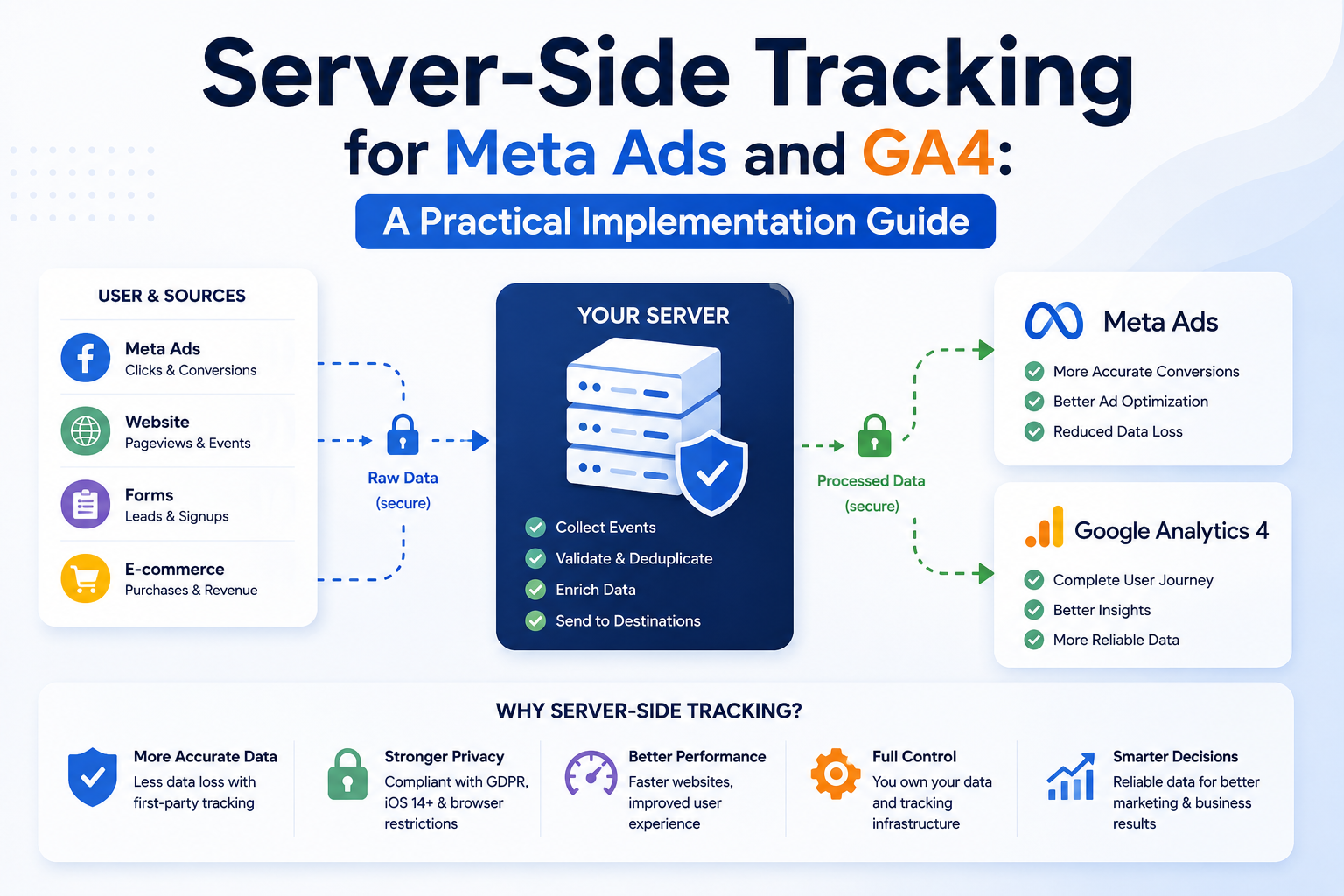
Learn how to design server-side tracking for Meta Ads and GA4 using clean event schemas, consent controls, deduplication, first-party data, CRM outcomes, and reliable validation.
Server-Side Tracking for Meta Ads and GA4: A Practical Implementation Guide
Server-side tracking for Meta Ads and GA4 is often presented as a quick fix for missing conversions. In practice, it is an architecture project involving websites, browsers, servers, consent systems, analytics platforms, advertising platforms, CRM records, and data governance.
Sending events from a server does not repair unclear event definitions, duplicate tags, broken forms, weak consent controls, or inaccurate CRM data. A reliable implementation begins by defining which business actions matter, where those actions become trustworthy, and which systems should receive them.
This guide explains how to plan and implement a server-side measurement architecture that improves data reliability without treating platform-reported conversions as unquestionable truth.
Meta description: Implement server-side tracking for Meta Ads and GA4 with event governance, Meta CAPI, consent controls, deduplication, CRM outcomes, and testing.
Search intent: Informational
Navigation
1. Why browser-only tracking loses information
2. How server-side tracking works
3. Event design and data governance
4. Meta Conversions API implementation
5. GA4 server-side implementation
6. Consent, security, and privacy
7. Validation, monitoring, and attribution
8. Frequently asked questions
9. Conclusion
1. Why Browser-Only Tracking Loses Information
Traditional website tracking runs through scripts in the user’s browser. These scripts may send page views, form submissions, purchases, or other events to analytics and advertising platforms.
Browser tracking remains useful because it can observe interactions such as:
- Page views
- Button clicks
- Scroll activity
- Form starts
- Product views
- Client-side errors
- User interface behavior
However, browser data can be incomplete because of:
- Tracking prevention
- Ad blockers
- Script failures
- Consent choices
- Network interruption
- Page navigation before the request finishes
- Browser restrictions
- Incorrect tag sequencing
- Duplicate tag installations
- Third-party script blocking
- Single-page application routing errors
Server-side tracking creates another controlled path for sending selected events.
What Server-Side Tracking Does
A typical flow looks like this:
User action
    ↓
Website or application
    ↓
First-party server endpoint
    ↓
Validation and enrichment
    ↓
GA4 Measurement Protocol
Meta Conversions API
CRM
Data warehouse
Other approved systems
The server can validate event structure, attach permitted first-party context, remove unsupported fields, generate consistent identifiers, and route the event to several destinations.
What It Does Not Do
Server-side tracking does not:
- Override user consent
- Recover every blocked event
- Guarantee platform attribution
- Replace analytics planning
- Correct a weak CRM process
- Create legal permission to process data
- Prove that an ad caused a sale
- Remove the need for browser events
- Guarantee better campaign performance
It should be treated as measurement infrastructure.
High Cost-Per-Acquisition on Meta & LinkedIn Ads?
We set up CAPI tracking and high-converting retargeting funnels for verified ROAS growth.
2. How Server-Side Tracking for Meta Ads and GA4 Works
A practical architecture usually combines browser and server events.
Browser events provide immediate interaction context. Server events provide controlled delivery for events the business can confirm, such as a completed form, successful payment, approved booking, qualified lead, or closed sale.
Three Common Architectures
#### Direct Application Integration
The website backend sends events directly to Meta and GA4.
Next.js / Django / Node / Laravel
        ├── Meta CAPI
        └── GA4 Measurement Protocol
This approach gives engineers strong control and fits custom applications.
#### Server-Side Tag Manager
The browser sends data to a first-party tagging endpoint. A server-side tag container validates and forwards events.
Browser
   ↓
First-party tagging domain
   ↓
Server-side tag container
   ├── GA4
   ├── Meta
   └── Other approved destinations
This can improve tag governance and reduce direct third-party calls from the browser.
#### CRM or Backend Outcome Integration
The CRM sends later-stage events after qualification or sale.
Website lead
   ↓
CRM
   ↓
Qualified lead / closed sale
   ↓
Meta and analytics destinations
This is valuable for businesses where form submissions are not equal in quality.
Architecture Comparison
| Model | Best For | Main Strength | Main Risk | |
|---|---|---|---|---|
| Direct backend | Custom applications | Full engineering control | Higher developer ownership | |
| Server-side tag manager | Multi-platform marketing stacks | Central tag routing | Container complexity | |
| CRM outcome events | Long sales cycles | Measures lead quality | Weak CRM hygiene | |
| Hybrid | Mature marketing operations | Broad measurement coverage | Deduplication and governance |
Server-Side Tracking for Meta Ads and GA4 Data Flow
A mature data flow can separate event collection from platform delivery.
Browser or backend
      ↓
Event collector
      ↓
Schema validation
      ↓
Consent and policy checks
      ↓
Queue or event stream
      ↓
Destination adapters
      ├── Meta
      ├── GA4
      ├── CRM
      └── Warehouse
A queue such as Redis, a managed message service, or a cloud event system can prevent temporary platform failures from blocking the user’s request.
Do not delay a checkout confirmation or form success response while waiting for an advertising API.
3. Event Design and Data Governance
The quality of server-side tracking depends on event definitions.
A business should create an event dictionary before writing integration code.
Build an Event Dictionary
| Event | Trigger | Source of Truth | Required Fields | Destination | |
|---|---|---|---|---|---|
| page_view | Page rendered | Browser | URL, title, session ID | GA4 | |
| generate_lead | Form accepted | Backend | event ID, service, source | GA4, Meta | |
| book_appointment | Booking confirmed | Booking system | event ID, service, time | GA4, Meta | |
| qualified_lead | Sales qualification | CRM | lead ID, status, value band | Meta, warehouse | |
| purchase | Payment confirmed | Payment backend | order ID, value, currency | GA4, Meta | |
| refund | Refund completed | Payment backend | order ID, refund value | GA4, warehouse |
The source of truth matters. A button click is not a completed lead. A payment page view is not a purchase. A form submission event should fire only after the server accepts and stores the enquiry.
Use Stable Event Identifiers
Event IDs support deduplication and debugging.
A browser and server can send the same conversion event with the same identifier. Platforms that support deduplication can recognize that they represent one business action.
Example event ID:
import { randomUUID } from "node:crypto";

const eventId = randomUUID();
The identifier should be generated once and passed through the relevant systems.
Avoid generating a new ID independently in the browser and server for the same conversion.
Keep Event Payloads Focused
Do not send every available field.
A payload should include only data required for:
- Event processing
- Attribution
- Reporting
- Deduplication
- Permitted matching
- Debugging
- Business analysis
More data creates more privacy, security, and maintenance responsibility.
Use Consistent Naming
Choose one naming convention.
Example:
form_start
generate_lead
book_appointment
qualified_lead
purchase
refund
Avoid parallel names such as:
lead
Lead
form_submit
contact_form
new_enquiry
conversion_form
Inconsistent naming fragments reports and makes QA harder.
Separate Technical and Business Events
Technical events describe system behavior:
- api_error
- form_validation_error
- payment_failure
- webhook_retry
Business events describe meaningful outcomes:
- generate_lead
- book_appointment
- purchase
- qualified_lead
Send technical events to monitoring systems unless they have a defined analytics use.
4. Meta Conversions API Implementation
Meta Conversions API allows approved events to be sent from a server or connected platform.
A standard implementation may combine Pixel browser events with server events.
Browser and Server Deduplication
For a lead event:
1. The browser receives an event ID.
2. The browser sends the Pixel event with that ID.
3. The backend confirms the lead.
4. The backend sends the server event with the same ID.
5. Meta attempts to deduplicate the pair.
Browser example:
<script>
  fbq(
    "track",
    "Lead",
    {
      content_name: "Technical SEO Consultation"
    },
    {
      eventID: "0f964179-4ed0-4556-a8b2-a92e030e5611"
    }
  );
</script>
Server payload structure:
{
  "data": [
    {
      "event_name": "Lead",
      "event_time": 1785146400,
      "event_id": "0f964179-4ed0-4556-a8b2-a92e030e5611",
      "action_source": "website",
      "event_source_url": "https://example.com/contact",
      "user_data": {
        "em": ["hashed_email_value"],
        "ph": ["hashed_phone_value"]
      },
      "custom_data": {
        "content_name": "Technical SEO Consultation"
      }
    }
  ]
}
Values and fields must follow Meta’s current API requirements. Access tokens must remain on the server.
Hashing and Normalization
Certain customer information used for matching may require normalization and hashing before transmission.
Normalization can include:
- Trimming spaces
- Lowercasing email addresses
- Standardizing phone numbers
- Removing unsupported punctuation
- Applying the required hash algorithm
Hashing does not make unrestricted data collection acceptable. The business still needs a valid basis and appropriate consent where required.
Node.js Example
import crypto from "node:crypto";

function sha256(value: string): string {
  return crypto
    .createHash("sha256")
    .update(value.trim().toLowerCase())
    .digest("hex");
}

type MetaLeadInput = {
  eventId: string;
  eventTime: number;
  email?: string;
  sourceUrl: string;
};

export async function sendMetaLead(input: MetaLeadInput) {
  const pixelId = process.env.META_PIXEL_ID;
  const accessToken = process.env.META_CAPI_ACCESS_TOKEN;

  if (!pixelId || !accessToken) {
    throw new Error("Meta tracking configuration is missing");
  }

  const userData: Record<string, string[]> = {};

  if (input.email) {
    userData.em = [sha256(input.email)];
  }

  const response = await fetch(
    `https://graph.facebook.com/vXX.X/${pixelId}/events?access_token=${accessToken}`,
    {
      method: "POST",
      headers: {
        "Content-Type": "application/json",
      },
      body: JSON.stringify({
        data: [
          {
            event_name: "Lead",
            event_time: input.eventTime,
            event_id: input.eventId,
            action_source: "website",
            event_source_url: input.sourceUrl,
            user_data: userData,
          },
        ],
      }),
    }
  );

  if (!response.ok) {
    const errorBody = await response.text();
    throw new Error(`Meta CAPI request failed: ${errorBody}`);
  }

  return response.json();
}
Replace the version placeholder with a currently supported Graph API version during implementation.
Do Not Block the User Request
A form endpoint should store the lead before attempting marketing delivery.
A safer sequence:
1. Validate form.
2. Store lead.
3. Return success.
4. Queue analytics jobs.
5. Send events.
6. Retry temporary failures.
7. Record delivery status.
If Meta is unavailable, the visitor should still receive confirmation and the sales team should still receive the lead.
Send Deeper Funnel Events
Businesses with sales teams should consider sending:
- Lead
- Schedule
- Qualified lead
- Converted lead
- Purchase
The event should represent a real stage in the company’s process.
For example, a qualified lead might require:
- Correct service
- Valid location
- Suitable budget
- Genuine contact information
- Confirmed need
- Sales acceptance
Document the definition so reporting remains consistent.
5. GA4 Server-Side Implementation
GA4 can receive events through browser tagging and the Measurement Protocol.
Server events are useful for confirmed backend actions, offline outcomes, subscription events, refunds, or CRM stages.
Client and Session Context
A server event needs enough context to be useful in GA4.
Depending on the implementation, this may include:
- Client ID
- User ID where appropriate
- Session ID
- Event timestamp
- Event name
- Event parameters
- Page location
- Transaction ID
The website can collect the GA client identifier and pass it with the form or transaction, subject to consent and policy requirements.
Measurement Protocol Example
type GA4Event = {
  clientId: string;
  name: string;
  params: Record<string, string | number | boolean>;
};

export async function sendGA4Event(event: GA4Event) {
  const measurementId = process.env.GA4_MEASUREMENT_ID;
  const apiSecret = process.env.GA4_API_SECRET;

  if (!measurementId || !apiSecret) {
    throw new Error("GA4 server tracking configuration is missing");
  }

  const endpoint = new URL(
    "https://www.google-analytics.com/mp/collect"
  );

  endpoint.searchParams.set("measurement_id", measurementId);
  endpoint.searchParams.set("api_secret", apiSecret);

  const response = await fetch(endpoint, {
    method: "POST",
    headers: {
      "Content-Type": "application/json",
    },
    body: JSON.stringify({
      client_id: event.clientId,
      events: [
        {
          name: event.name,
          params: event.params,
        },
      ],
    }),
  });

  if (!response.ok) {
    throw new Error(
      `GA4 request failed with status ${response.status}`
    );
  }
}
The Measurement Protocol should be validated against current GA4 documentation during development.
Transaction Events
A purchase should use the confirmed order record rather than the checkout button.
{
  "name": "purchase",
  "params": {
    "transaction_id": "ORDER-10482",
    "currency": "USD",
    "value": 1250,
    "items": [
      {
        "item_id": "CONSULT-SEO",
        "item_name": "Technical SEO Audit",
        "quantity": 1,
        "price": 1250
      }
    ]
  }
}
Do not send revenue until payment or the relevant commercial event is confirmed according to the company’s accounting model.
User ID Versus Client ID
A client ID identifies a browser or device instance.
A user ID is assigned by the business for authenticated users and should not contain direct personal information.
Do not place email addresses, phone numbers, names, or other prohibited data in GA4 event parameters or user IDs.
Server-Side Google Tag Manager
A server-side tag container can receive events through a first-party subdomain, such as:
https://metrics.example.com
Potential benefits include:
- Central destination control
- Payload transformation
- Removal of unwanted fields
- Consistent consent logic
- Reduced browser-side vendor calls
- First-party request routing
- Easier destination management
Operational requirements include:
- Cloud hosting
- Domain configuration
- Container security
- Logging
- scaling
- cost monitoring
- version control
- tag review
- uptime monitoring
Moving tags to a server container does not remove engineering responsibility.
6. Consent, Security, and Privacy
Measurement architecture must enforce user choices.
Consent Should Affect Data Flow
A consent management platform may provide states for:
- Analytics storage
- Advertising storage
- Personalization
- Functional storage
- User data
- Ad personalization
The server must receive the relevant consent state when it determines whether an event can be forwarded.
Do not assume that moving an event to the server removes consent requirements.
Minimize Personal Data
Review every destination and field.
Ask:
- Is this field required?
- Is it allowed by the platform?
- Does the user understand the collection?
- Is consent required?
- Is the value stored in logs?
- How long is it retained?
- Can access be restricted?
- Can it be removed if required?
Avoid logging full event payloads when they contain sensitive or identifying fields.
Protect Credentials
API secrets and access tokens should be stored in:
- Environment variables
- Managed secret systems
- Restricted deployment settings
Do not expose them in:
- Browser code
- public repositories
- page source
- screenshots
- CMS fields
- shared spreadsheets
- client-side network requests
Rotate credentials after suspected exposure.
Secure the Collection Endpoint
A public tracking endpoint may be abused.
Protect it with:
- Schema validation
- Request size limits
- Rate limiting
- Origin checks where appropriate
- Authentication for trusted backend sources
- Replay protection for sensitive events
- Bot detection
- Input sanitization
- logging controls
- alerting
Example validation with Zod:
import { z } from "zod";

const leadEventSchema = z.object({
  eventId: z.string().uuid(),
  clientId: z.string().min(1).max(255),
  sourceUrl: z.string().url(),
  service: z.string().min(1).max(120),
  consent: z.object({
    analytics: z.boolean(),
    advertising: z.boolean(),
  }),
});
Validation reduces malformed events and limits arbitrary input.
Security Headers and Transport
Use HTTPS for all event transmission.
Application security should also include:
- Content Security Policy
- Strict transport controls
- secure cookies
- SameSite settings
- XSS prevention
- SQL injection prevention
- restricted CORS
- dependency monitoring
- access logs
- incident procedures
Tracking infrastructure should follow the same security standards as the rest of the application.
7. Validation, Monitoring, and Attribution
A tracking implementation is not complete when the first event appears in a dashboard.
It needs documented testing and ongoing monitoring.
Validation Matrix
| Test | Expected Result | |
|---|---|---|
| Form rejected | No lead event | |
| Form stored successfully | One confirmed lead event | |
| Browser and server both send | One deduplicated conversion | |
| User denies advertising consent | No advertising event | |
| Meta API unavailable | Lead stored and event retried | |
| Duplicate webhook received | No duplicate purchase | |
| Payment fails | No purchase event | |
| Refund completes | Refund event sent | |
| Missing client ID | Event handled according to policy | |
| Bot submission | Lead and conversion suppressed |
Meta Testing
Use platform testing tools to inspect:
- Event name
- Browser or server source
- Event ID
- Deduplication
- Match fields
- timestamps
- action source
- diagnostics
- rejected parameters
Do not judge quality only by the number of events received. Compare received events with backend truth.
GA4 Testing
Use:
- DebugView
- Realtime reports
- validation endpoints where available
- network inspection
- BigQuery export where configured
- backend delivery logs
Confirm:
- Event names
- parameter types
- client ID handling
- session association
- transaction IDs
- values and currency
- duplicate events
- consent behavior
Reconcile Against the Source of Truth
Create a daily or weekly reconciliation table.
| Metric | Backend | GA4 | Meta | Variance Review | |
|---|---|---|---|---|---|
| Accepted leads | 120 | 114 | 108 | Check consent and delivery | |
| Bookings | 42 | 41 | 36 | Review event matching | |
| Purchases | 18 | 18 | 15 | Review attribution window | |
| Revenue | $45,000 | $45,000 | Platform-attributed | Do not expect direct equality |
Platform totals may differ because each system applies its own processing and attribution rules.
The backend remains the source of truth for actual leads, orders, refunds, and revenue.
Separate Measurement From Attribution
Measurement answers:
- Did the event occur?
- Which source data was recorded?
- Was the event delivered?
- Was it duplicated?
- Was consent respected?
Attribution answers:
- Which marketing interaction receives credit?
- Which model is used?
- Which time window applies?
- How are cross-device interactions treated?
- How are view-through conversions handled?
A campaign platform may claim credit for a conversion that another analytics model assigns elsewhere. This does not automatically mean either system is broken.
Monitor Operational Health
Track:
- Delivery success rate
- API errors
- retry volume
- queue age
- rejected payloads
- event delay
- duplicate event rate
- consent state distribution
- missing identifiers
- schema version
- unexpected volume changes
Alerts should detect sudden drops or spikes.
A tracking system that fails quietly can influence budget decisions before the problem is discovered.
Implementation Readiness Checklist
- [ ] Business events are defined
- [ ] Sources of truth are assigned
- [ ] Event names are consistent
- [ ] Event IDs support deduplication
- [ ] Consent rules are documented
- [ ] Personal data is minimized
- [ ] Secrets stay server-side
- [ ] Payloads are validated
- [ ] Failed requests are retried safely
- [ ] Purchase events use confirmed orders
- [ ] CRM stages have clear definitions
- [ ] Browser and server events are tested
- [ ] Platform diagnostics are reviewed
- [ ] Backend reconciliation exists
- [ ] Monitoring and alerts are active
- [ ] Documentation has an owner
Frequently Asked Questions
Does server-side tracking bypass ad blockers?
Not in every case, and bypassing user choice should not be the objective. A server can reliably send events that occur in backend systems, but browser identifiers, consent states, and source data may still be unavailable.
Is Meta Conversions API a replacement for the Meta Pixel?
It can be used independently, but many websites use both browser and server events. The combination can preserve browser context and provide a confirmed server path. Deduplication must be configured correctly.
Does server-side tracking guarantee more reported conversions?
No. Results depend on consent, event quality, identifiers, platform processing, and implementation accuracy. The goal is more reliable measurement, not inflated reporting.
Can GA4 receive CRM events?
Yes, backend systems can send defined events through supported interfaces. The implementation must avoid prohibited data, preserve suitable identifiers, and use consistent event definitions.
What is event deduplication?
Deduplication prevents browser and server copies of the same business action from being counted twice. It commonly depends on matching event names and event IDs within the platform’s supported process.
Should every website use server-side tracking?
No. A small website with limited campaigns may receive little value from a complex server setup. The investment is more justified when advertising spend, lead value, transaction volume, privacy requirements, or reporting complexity are material.
How should failed API requests be handled?
Store or queue the event, classify the failure, retry temporary errors with controlled backoff, and stop retrying permanent validation errors. Never make the user repeat a purchase or form submission because a marketing endpoint failed.
Can server-side tracking improve Meta Ads optimization?
It may provide Meta with more complete or higher-quality conversion signals when implemented correctly. Campaign performance still depends on offer quality, creative, audience, landing pages, budget, sales follow-up, and market demand.
Conclusion: Treat Tracking as Business Infrastructure
Server-side tracking for Meta Ads and GA4 is valuable when it creates a more dependable connection between real business outcomes and marketing systems.
The strongest implementations share several characteristics:
- Events represent confirmed actions.
- Browser and server events use reliable identifiers.
- Consent affects collection and delivery.
- Personal data is minimized.
- CRM outcomes are defined consistently.
- Platform delivery is reconciled with backend truth.
- Failures are monitored.
- Marketing APIs never block the user experience.
- Attribution reports are interpreted rather than accepted without review.
A rushed implementation can produce duplicate conversions, privacy risk, false revenue, broken attribution, and poor campaign decisions. A governed implementation gives marketing and leadership a clearer view of lead quality, sales outcomes, and measurement confidence.
ApexPulse designs tracking architectures for websites, ecommerce platforms, SaaS products, and lead-generation systems. Book a free strategy session to review your current Pixel, GA4, consent, CRM, and server event setup before investing in a broader implementation.
Get a Free Meta Ads & Conversion Pixel Audit
Review your Server-Side CAPI tracking, ad creative fatigue, and audience targeting to lower cost-per-acquisition.
“0.7s Load Speed | 99/100 Core Web Vitals | Reliable Civic News Delivery”